


A 60-page CRO audit report might look impressive. But if all it tells you is to make your CTAs bigger, simplify your checkout, and add more testimonials, what exactly are you paying for?
A good CRO audit should uncover problems you didn’t know existed, explain what’s causing them, and show you what to fix or test first.
So, how do you tell a genuinely useful CRO audit from an expensive list of best practices? Here’s what to look for before you sign the contract.
What Should a CRO Audit Include? The 8 Essential Components
Not every CRO audit needs to follow the exact same process. But if you’re paying for a comprehensive audit, these eight components should be on your checklist.
| CRO Audit Component | What It Should Cover |
|---|---|
| 1. Analytics and Tracking Audit | Verify conversion tracking, identify data inaccuracies, and establish a reliable performance baseline. |
| 2. Funnel and Segmentation Analysis | Identify where visitors drop off and how conversion behavior differs across devices, traffic sources, and customer segments. |
| 3. Heuristic and UX Evaluation | Examine usability, navigation, page layouts, forms, and checkout flows to identify potential conversion barriers. |
| 4. Heatmaps and Session Recordings | Analyze how visitors interact with key pages, including where they click, scroll, hesitate, or abandon their journey. |
| 5. Customer Research and Usability Testing | Gather direct customer feedback to understand purchase motivations, objections, confusion, and unmet expectations. |
| 6. Messaging and Competitive Analysis | Evaluate the clarity of your value proposition, persuasive messaging, and how your website compares with competitors. |
| 7. Evidence-Based Testing Hypotheses | Turn research findings into specific, measurable hypotheses that can guide future A/B tests. |
| 8. Prioritized CRO Roadmap | Rank optimization opportunities by potential impact, supporting evidence, and implementation effort. |
Now, let’s examine each component in detail, including what a CRO agency should investigate and what you should expect to receive.
1. Analytics and tracking validation
Imagine spending thousands on a CRO audit, only to discover your website has been counting the same purchase twice.
That’s why your CRO agency should first check whether your analytics data is accurate.
Here’s what that involves (and how you can check some of it yourself):
- Check if conversions are being recorded correctly. Just because someone clicks the “Submit” button doesn’t mean they’ve submitted a form. They might get an error and leave. Your agency should test this using GA4’s DebugView to see whether conversion events fire only after a successful action.
- Look for duplicate or missing conversions. If one customer makes one purchase, GA4 shouldn’t count it as two. Your agency can use Google Tag Manager’s Preview mode to check when tracking tags fire. For purchases, they should also check transaction IDs to help prevent double-counting.
- Compare analytics with actual sales or leads. Say Shopify shows 200 orders, but GA4 reports 260. Where did those extra 60 purchases come from? Your agency should investigate differences like these rather than blindly trusting the dashboard. The same applies to comparing GA4 form submissions with leads in your CRM.
- Check whether the funnel data makes sense. Open GA4 → Explore → Funnel exploration to see how people move from viewing a product to adding it to their cart and completing a purchase. If you aren’t tracking key events, those drop-off numbers may be misleading.
- Check where conversions are coming from. Your agency should review conversions by traffic source, device, and landing page. It should also check for tracking issues that make payment providers appear to refer customers to your website.
And keep this in mind: even when your tracking works perfectly, your overall conversion rate can hide important problems.
For example, when Invesp worked with Soft Surroundings, a women’s apparel retailer, we found that most of its traffic came from mobile devices. But its mobile conversion rate was only about half its desktop conversion rate.
That’s a pretty big difference, right?
It told our team that mobile deserved a closer look. We combined analytics with customer research and usability testing, and eventually identified more than 100 conversion opportunities.
One thing we’d recommend: don’t settle for an audit report that says “Google Analytics reviewed” with a green checkmark next to it.
Ask your agency what they tested, whether they found any tracking problems, and which numbers you can confidently use to make decisions.
2. Funnel analysis and visitor segmentation
Your website might have a 3% conversion rate. But what if Google visitors convert at 5%, while paid social visitors convert at just 1%?
Your overall conversion rate won’t tell you where the real problems are.
Here’s what your CRO agency should investigate:
- Where visitors drop off: Use GA4 → Explore → Funnel exploration to follow the journey from product views to purchases. Look for unusual drop-offs rather than assuming every abandonment is a website problem.
- How different visitors behave: Compare mobile vs. desktop, paid vs. organic traffic, and new vs. returning visitors to identify segments worth investigating.
- Which landing pages underperform: Look at conversions alongside traffic sources and visitor intent. A blog post shouldn’t be judged by the same standards as a product page.
- Why visitors might leave: Funnel data shows where people drop off, not why. Your agency should use customer research and session recordings to investigate possible causes.
Here’s a good example of why segmentation matters.
Look at this GA4 funnel report from Google’s Merchandise Store demo account.
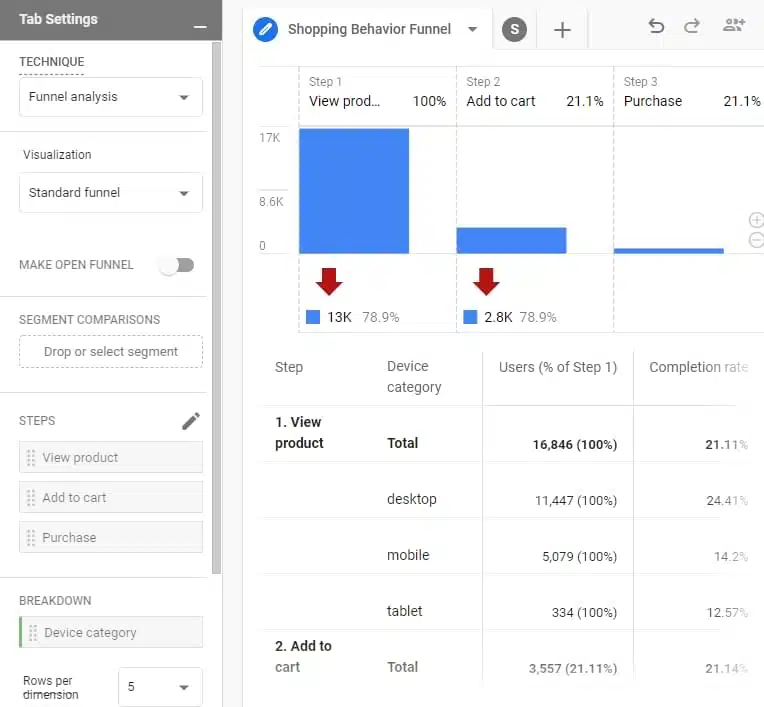
GA4 funnel showing product views, add-to-cart rates, and conversion differences across devices (Source)
Of the 16,846 visitors who viewed a product, only 21.1% added something to their cart.
But look at the device breakdown.
While 24.4% of desktop visitors added a product to their cart, only 14.2% of mobile visitors did.
That’s a gap of more than 10 percentage points.
Does it mean the mobile product pages are difficult to use? Maybe. But it could also reflect differences in visitor intent, traffic sources, or the shopping experience.
That’s where your CRO agency should dig deeper, using session recordings, usability testing, and customer research to understand what’s happening.
One thing to watch for: A 70% drop-off doesn’t automatically mean you’ve found your biggest opportunity. If that step gets only 100 visitors, fixing it may matter less than a smaller drop-off affecting 50,000 visitors.
Your audit should do a thorough conversion funnel analysis to identify the funnel stages and visitor segments worth investigating, along with the potential business impact.
3. Heuristic evaluation and UX friction
Ever abandoned a checkout because you couldn’t find the delivery charges? Or given up on a form because the error message made absolutely no sense?
A heuristic evaluation helps uncover these frustrating experiences before they cost you more customers.
Your CRO agency should examine:
- Navigation and page structure: Can visitors easily find products, pricing, and important information?
- Forms and checkout: Are unnecessary fields, confusing errors, or unexpected costs making conversions harder?
- Trust signals: Are customer reviews, return policies, and guarantees visible when visitors need reassurance?
- Messaging and CTAs: Is your offer easy to understand, and is the next step obvious?
Here’s an example from one of our recent experiments.
We noticed something interesting on an ecommerce client’s homepage. Visitors who reached the product sections showed strong interest, but many weren’t scrolling far enough to see them.
And those who did? They had to work through cluttered product cards where prices and buttons weren’t exactly easy to spot.
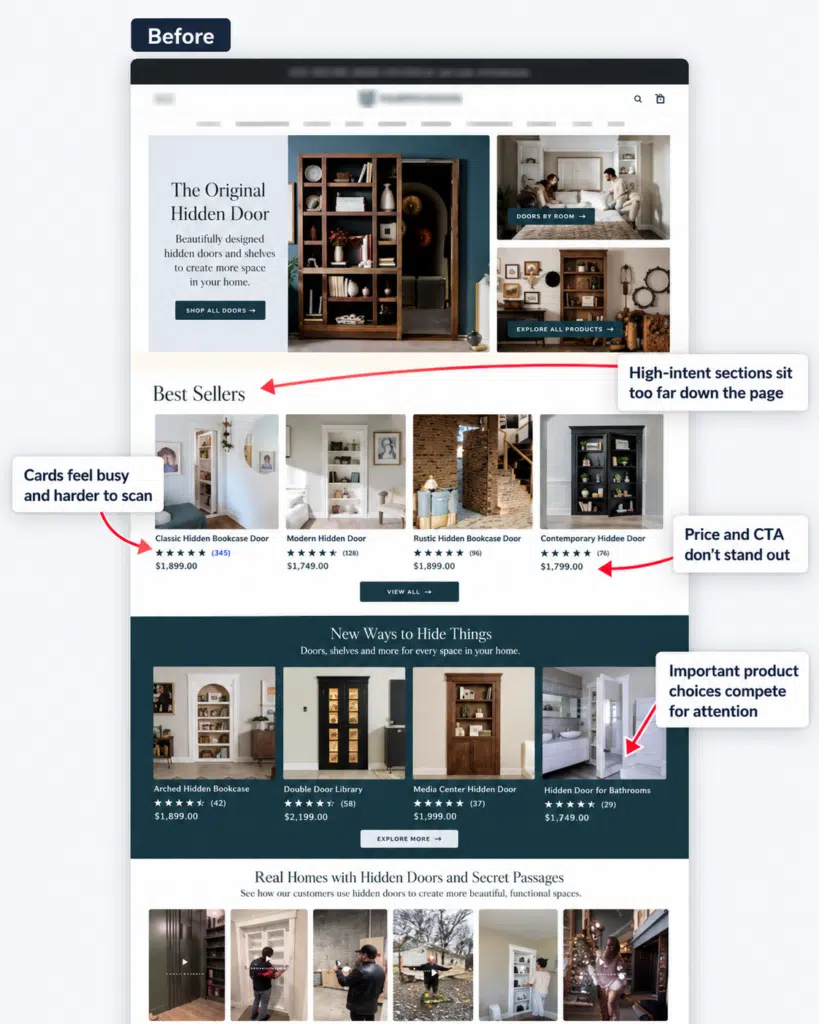
Ecommerce homepage with cluttered product cards and hard-to-find prices and CTAs
Not ideal when you’re trying to sell something.
So we tested a cleaner layout that made products easier to scan, with clearer pricing and CTAs.
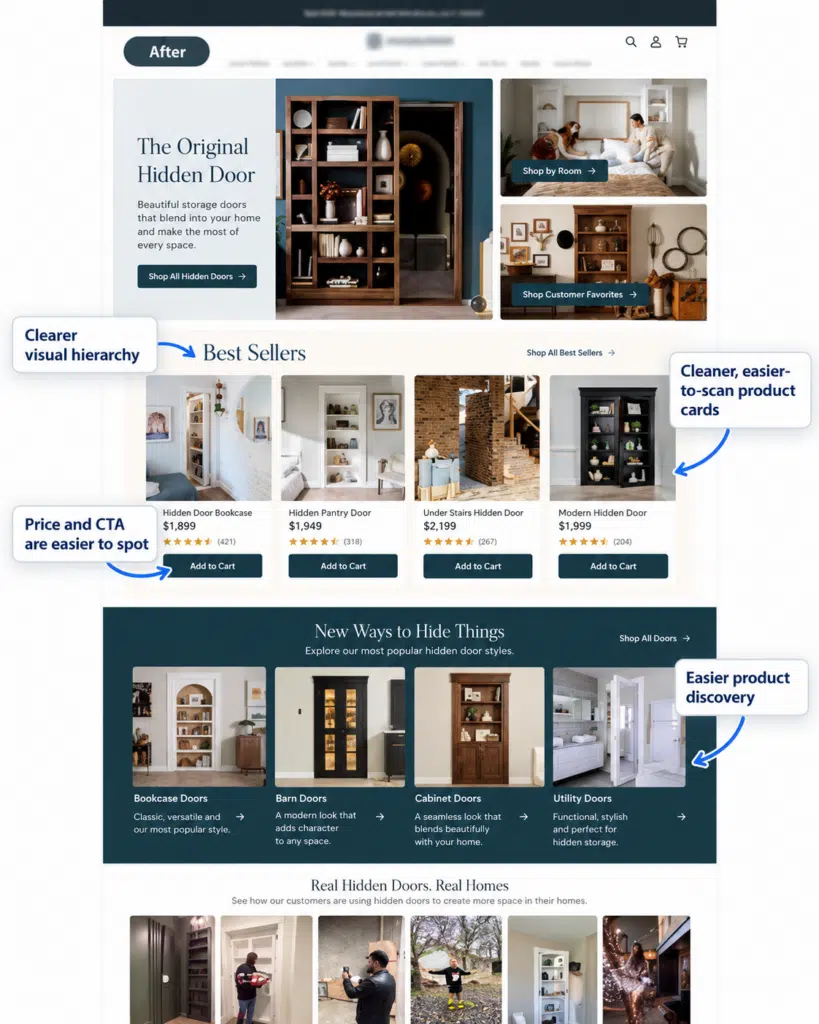
Simplified homepage with clearer product cards, pricing, and CTAs
The result? The conversion rate increased from 0.53% to 0.64%, a relative lift of approximately 21% during the test.
Here’s what you can learn from this: Don’t assume visitors need more information. Sometimes, they just need you to make the important stuff easier to find.
And when reviewing your CRO audit, ask your agency to explain why each recommended change might work.
At Invesp, we use our Conversion Framework to evaluate factors such as trust, buying motivations, customer doubts, and how complicated a purchase feels.
4. Heatmaps and session recordings
Ever wondered what visitors actually do on your website before leaving?
Heatmaps and session recordings give you a peek. And sometimes, what you discover isn’t what you expected.
Your CRO agency should use these tools to investigate:
- Where visitors click: Heatmaps reveal which buttons, links, and page elements get attention. Repeated clicks on something that isn’t clickable? That could signal confusion.
- How far visitors scroll: Scroll maps show whether people reach important information, such as pricing, product details, or CTAs.
Take this scroll map from Invesp’s website, for example.
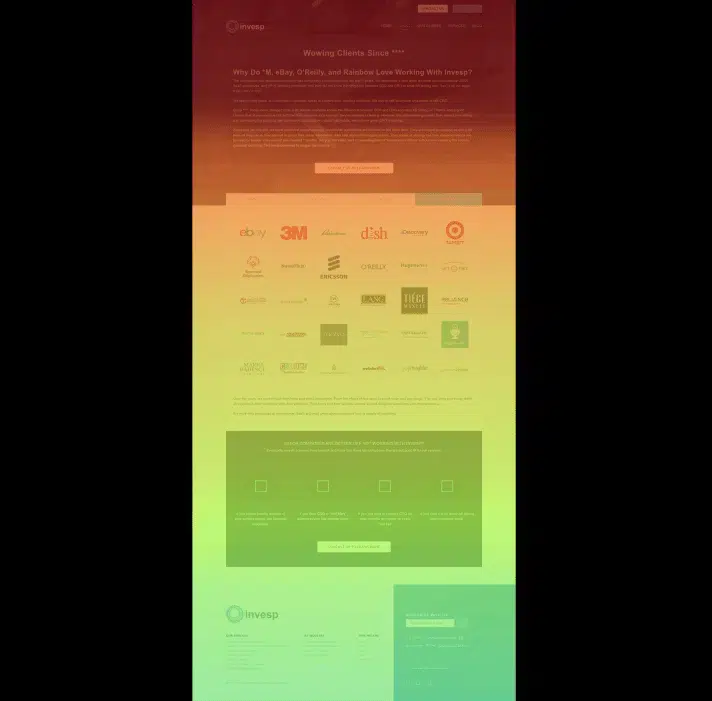
Scroll heatmap of Invesp’s website showing decreasing visitor exposure further down the page (Source)
The red and yellow areas show where more visitors reached, while the green areas indicate fewer visitors scrolled that far.
If your main CTA sits in a section hardly anyone reaches, that’s worth investigating.
But remember, low scroll depth doesn’t automatically mean there’s a problem. Your agency should look at visitor behavior and page context before recommending changes.
- Where visitors get stuck: Session recordings let you watch individual journeys. Look for repeated clicks, form errors, confusing navigation, or visitors going back and forth between pages.
- Which visitors experience problems: Your agency should filter recordings by device, traffic source, and behavior. Watching 50 random recordings isn’t nearly as useful as reviewing sessions where mobile visitors abandoned checkout.
Here’s something we’ve learned from analyzing session recordings at Invesp: It’s easy to see what you expect to see.
That’s why multiple CRO specialists have reviewed the same recordings independently. A second pair of eyes can catch problems someone else missed and help challenge assumptions.
But remember, a heatmap isn’t a mind reader. Lots of clicks don’t automatically mean visitors are interested or confused. And one frustrating session doesn’t mean everyone has the same problem.
Your agency should identify recurring patterns and connect them with other research before recommending changes.
5. Voice-of-customer research and usability testing
Want to know why visitors aren’t buying? Here’s a wild idea: ask them.
Analytics tells you what people do. Customer research helps you understand what they’re thinking.
Your CRO audit should include:
- Customer interviews: Talk to recent buyers and potential customers about what motivated them, which alternatives they considered, and what almost stopped them from buying.
- On-site surveys: Ask questions like “What’s stopping you from completing your purchase today?” on relevant pages.
- Usability testing: Give participants tasks such as finding a product or completing checkout. Watch where they struggle without telling them what to click.
- Customer reviews and support conversations: Look for recurring complaints, unanswered questions, and objections that your website might be overlooking.
Here’s an example from our own work.
When we worked with an online dance-learning business, we conducted 14 customer interviews. And we discovered something interesting.
People didn’t just want to buy dance lessons. They also wanted to reconnect with their partners, surprise their spouses, or bring some excitement back into their relationships.
That completely changed how we approached the messaging.
Instead of focusing only on dance instruction, we helped visitors picture what learning to dance could mean for their relationships.
Combined with our broader research and experimentation program, these changes drove a 40% increase in conversion rate over four months.
The takeaway? Don’t pay for an audit that relies entirely on what your agency thinks customers want. Ask what actual customers said, what patterns emerged, and how those findings shaped the recommendations.
6. Messaging, value proposition, and competitive analysis
Your website might look great. But if visitors can’t figure out why they should buy from you instead of your competitors, good design won’t save you.
Your CRO agency should investigate:
- Value proposition: Can visitors quickly understand what you offer and why it’s better or different?
- Messaging: Does your landing page deliver what your ads promise? Are you addressing the questions and objections that stop people from buying?
- Competitors: How do competing businesses communicate their benefits, pricing, guarantees, and offers? What might make customers choose them over you?
Here’s a simple test: Open your homepage and two competitors’ homepages side by side. Hide the logos. Can you clearly tell what makes each company different?
If they all sound the same, your messaging probably needs work.
7. Evidence-backed experiment hypotheses
“Make the CTA bigger.”
“Move the testimonials higher.”
If your CRO audit is full of recommendations like these, you’re paying for someone’s opinions.
A good audit should explain what needs changing, why it might work, and how you’ll measure success.
For example:
Weak recommendation: Move customer reviews closer to the Add to Cart button.
Better hypothesis: Customer interviews show that first-time visitors worry about product quality. Placing verified reviews near the Add to Cart button might address those concerns and increase purchases among new visitors.
See the difference?
The second version connects an actual customer problem to a proposed solution and a measurable outcome.
Your agency should provide research-backed hypotheses, along with the specific changes to test and the metrics to track.
And remember, a hypothesis isn’t a proven improvement. That’s what A/B testing is for.
8. Prioritized optimization roadmap
Imagine receiving a CRO audit with 50 recommendations.
Great. Now what?
Your agency shouldn’t leave you with a giant to-do list and a “good luck!”
It should organize recommendations based on:
- Potential impact: How many visitors are affected, and how much could fixing the problem improve results?
- Supporting evidence: Is the problem backed by actual research or just an expert’s opinion?
- Effort and feasibility: How difficult is the change, and do you have enough traffic to test it?
It should also separate technical issues that need fixing immediately from ideas that require testing.
For example, when we at Invesp worked with a fundraising platform, our research uncovered around 55 conversion bottlenecks, including usability issues and messaging problems.
We used those findings to test different versions of the donation pages, changing everything from the layout and copy to the CTA buttons. Each experiment helped us understand what encouraged visitors to donate.
After several weeks of research and A/B testing, we achieved a 16% increase in conversion rate.
The takeaway: Your audit should tell you what to tackle first, what needs further investigation, and what can wait. Otherwise, you’ve paid for a list of problems rather than a plan to solve them.
What does a proper CRO audit deliver at the end?
A 70-page audit report might look impressive. But if your team still doesn’t know what to fix first, what exactly have you paid for?
A proper CRO audit should give you:
- A findings report: What problems were discovered and what evidence supports them.
- Annotated screenshots: Exactly where visitors might be struggling.
- A prioritized list of opportunities: Which problems matter most and which ideas are worth testing.
- A clear action plan: What to fix, how to fix it, how much effort it requires, and who should handle it.
- A final walkthrough: A discussion with the agency to clarify findings and agree on next steps.
Here’s an example from one of our client engagements.
During a technical performance review, our team identified 12 fixes, including duplicate tracking code, unnecessary scripts, and images loading inefficiently.
Instead of handing the client a list of problems and calling it a day, we documented the exact issue, how to resolve it, how to check whether the fix worked, and who should take responsibility.
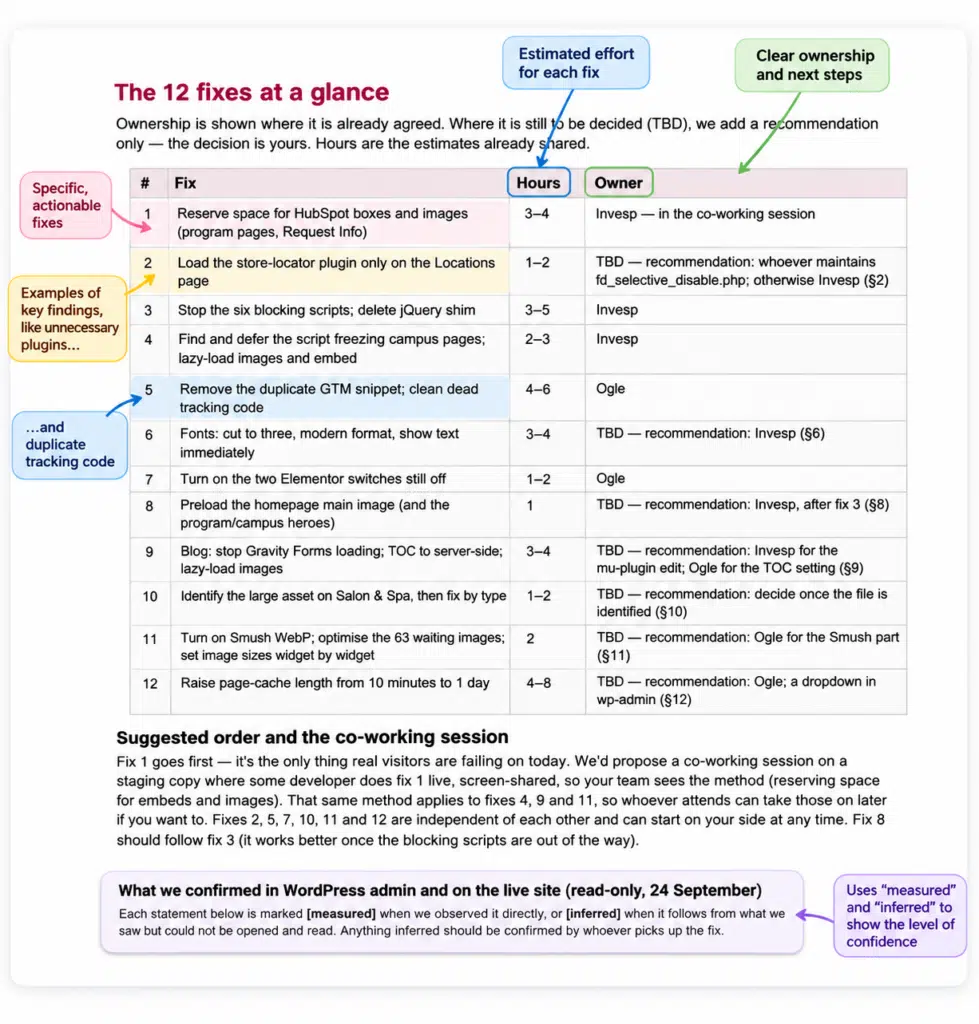
Example of an Invesp technical optimization action plan, showing recommended fixes, estimated implementation time, and ownership.
For example, we discovered that a store-locator plugin was loading unnecessary files on the homepage. Our recommendation explained where the plugin was being loaded, how to restrict it to the relevant page, and how to verify the change.
That’s what an actionable audit deliverable looks like. Your team should know what to do next without decoding the report.
What are the red flags of a low-quality CRO audit?
Not every audit that looks professional is actually useful.
Here are five warning signs we’d watch for before paying an agency:
- Every recommendation sounds like a best practice. “Make your CTA bigger” or “Add more testimonials” isn’t much use without evidence that these changes address a problem on your website.
- They skip analytics validation. If an agency never checks whether your conversions are being tracked correctly, how can it confidently tell you where you’re losing customers?
- There’s no customer research. Heatmaps and expert opinions have their place, but they can’t explain why customers hesitate or choose competitors.
- Everything is labeled high priority. If an agency finds 40 problems and says they’re all urgent, that’s not prioritization. That’s another problem.
- They guarantee a conversion lift. No agency can know exactly how much a website will improve before testing its ideas. Be wary of anyone promising otherwise.
Seven questions to ask before hiring a CRO audit agency
Before you sign the contract, ask your prospective agency:
- How will you check whether our conversion data is accurate? Ask what they’ll validate beyond simply looking at GA4 reports.
- Will you speak with actual customers? Find out whether interviews, surveys, or usability tests are included.
- Can you show us a sample audit report? You should know what you’re paying for before you pay.
- How do you decide which problems matter most? Look for a prioritization method that considers evidence, potential impact, and effort.
- Will your recommendations include supporting evidence? Each major finding should have a clear rationale.
- Who will help us implement the recommendations? Clarify whether design, development, and A/B testing cost extra.
- What happens after the audit? Will the agency walk you through the findings and help you decide what to tackle first?
What to look for before paying for a CRO audit
Before paying for a CRO audit, make sure you’re buying more than a list of things to change.
The best audits don’t just identify problems. They show you the evidence behind those problems, which ones deserve your attention, and what to do next.
And if you’re still figuring out what that process should look like, take a look at how we approach CRO audits at Invesp. It’ll give you a better idea of what goes into a research-led audit and what you should expect from one.
Frequently asked questions about CRO audits
How long does a CRO audit take?
A quick website review might take a few days, while a comprehensive CRO audit can take four to six weeks or longer, depending on your website’s size, complexity, and research requirements.
At Invesp, our comprehensive audit process is typically structured around six weeks. That gives our team time to investigate analytics, study visitor behavior, and conduct customer research instead of rushing through a checklist.
Can I conduct a CRO audit myself?
Absolutely. You can start by reviewing your GA4 funnel reports, watching session recordings, checking your forms and checkout, and asking customers what’s stopping them from converting.
But there’s a catch. It’s easy to overlook problems when you know your website too well. An experienced CRO team brings an outside perspective and can help connect findings from different research methods.
How often should you conduct a CRO audit?
There’s no universal schedule. A comprehensive audit can be useful when your conversion rate drops, you redesign your website, introduce a new customer journey, or notice that your optimization efforts have stalled.
For websites that change frequently, ongoing conversion research is usually more valuable than repeating the same full audit every few months.
Does a CRO audit include A/B testing?
Not always. An audit identifies conversion problems and develops hypotheses worth testing. Running A/B tests may require a separate engagement.
Before signing, ask whether your quote includes experiment design, development, execution, and results analysis.
What’s the difference between a UX audit and a CRO audit?
A UX audit focuses on how easy and intuitive your website is to use. A CRO audit goes further, investigating what stops visitors from taking valuable actions, such as purchasing, signing up, or requesting a demo.
There’s plenty of overlap, but a CRO audit connects usability findings with customer motivations, business goals, and conversion data.
How do you measure whether a CRO audit was worth the cost?
Don’t judge an audit by how many problems it uncovers. Finding 100 issues means little if none lead to meaningful improvements.
Instead, track how many recommendations were implemented or tested, what the experiments revealed, and whether you saw measurable improvements in conversion rate, revenue per visitor, or qualified leads.
And remember, the audit itself doesn’t guarantee a conversion lift. Its value comes from helping your team make better optimization decisions.