


What Are Product Recommendations
A product recommendation engine is a vital feature in e-commerce.
There is no way to argue against it. E-tailers widely use it (particularly top e-tailers; see Amazon.com), shoppers already expect to see it, and the benefits are indisputable (the statistics below provide compelling evidence).
This comprehensive piece will give you a full understanding of the world of product recommendations.
You will discover how product recommendations are generated in a personalized and dynamic manner, the types of recommendations you could use, and the locations in which you could implement them.
You will also learn some tips for best practices and common mistakes to avoid.
But before all of that, to fully convince you that product recommendations are extremely essential for your company, here are some reasons and statistics to prove it.
Dynamic Product Recommendations Engine is Essential
Why Is It Profitable?
1. The feature echoes the item suggestions made by in-store sales representatives that some customers desire.
Whereas in-store sales representatives ask shoppers about their needs, preferences, and affinities, on-site the product recommendation engine automatically generates suggestions based on a combination of rules.
2. The feature provides e-shoppers with a quick and easy way to view relevant items.
This can motivate “just-browsing” visitors to make a purchase, help “lost” customers find their dream items, assist hesitant shoppers in finding more fitting alternatives, and encourage “big” shoppers to add more items to their carts.
Since websites offer a vast range of items, product recommendations are an effective way to combat the issues caused by choice overload, such as abandonment, dissatisfaction, and cognitive dissonance.
3. Dynamic product recommendations transfer the right message to the right shopper at the right time.
Dynamic recommendations are as relevant as possible to each individual at the moment they are displayed (more on this is elaborated below). This also means the shopper’s experience is personalized.
Therefore, dynamic product recommendations optimize the product discovery process, improve customer experience, increase impulse purchases, and drive higher engagement, conversions, average order value, loyalty, and retention.
And the numbers don’t lie:
According to a study by Barilliance, in Q4 2014, personalized product recommendations accounted for 31% of the revenue of the best-performing sites, compared with a global average of 12%.
Additionally, customers who click on product recommendations have a conversion rate 5.5 times higher than those who do not.
According to a study by Invesp, 45% of e-shoppers are more likely to shop on a site that offers personalized product recommendations, and 56% are more likely to return to such a site.
Another Barilliance study found that product recommendations are also very effective in remarketing emails. They can lead to a 30% increase in sales conversion rates and a 35% increase in click-through rates in such emails.
Individual case studies also prove the effectiveness of dynamic product recommendations. EyeBuyDirect.com experienced a 175% increase in email click-through rate and a 30% increase in conversion rate, while Lux Fix experienced an 85.7% increase in email conversion rate.
Now that you know what the benefits are and why it is important to implement such a feature, let’s delve into the mechanics of how it works and how to implement it.
First, What Exactly Are Dynamic Product Recommendations?
A dynamic product recommendation engine is a feature that presents e-shoppers with item suggestions. The recommendations are automatically personalized and dynamic to be as relevant as possible to the individual shopper when they are presented.
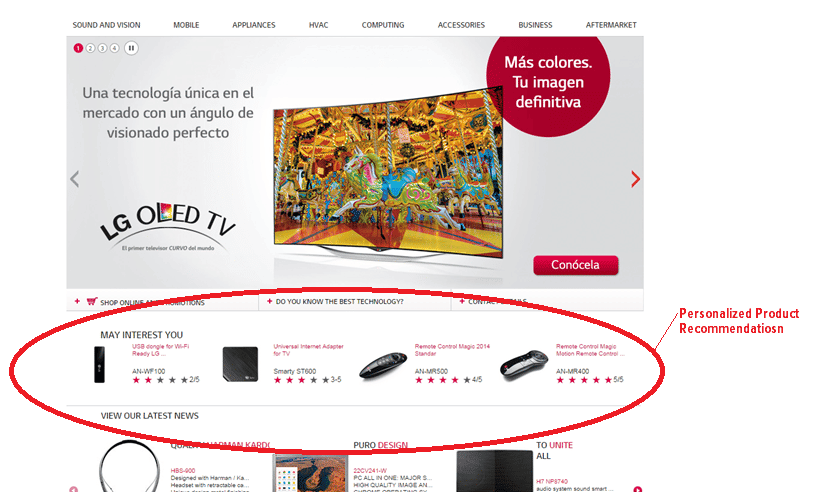
Which Type of Items Are Recommended?
There are numerous types of product recommendations. The following are the common types:
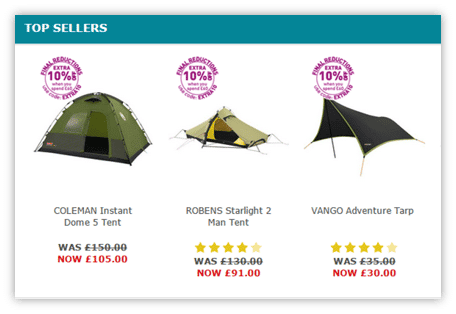
Generic Product Recommendations:
- Best sellers or popular items
- Trending items
- New arrivals
- Top rated
- Sales and promotions
Personalized Product Recommendations:
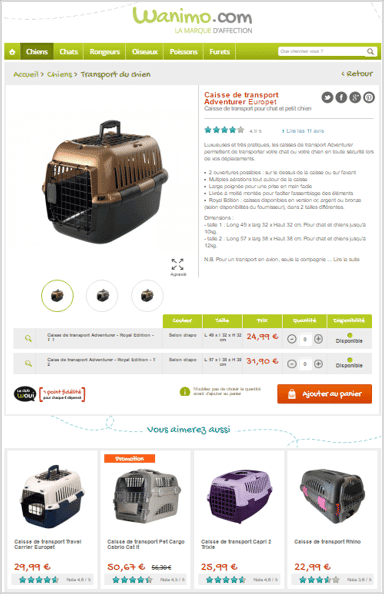
- Similar items (upselling)
This is used to expose shoppers to items that are more likely to meet their needs and desires, increasing the chances of a purchase.
- Complementary items (cross-selling)
This is used to entice shoppers to consider different items, thereby increasing the average order value.
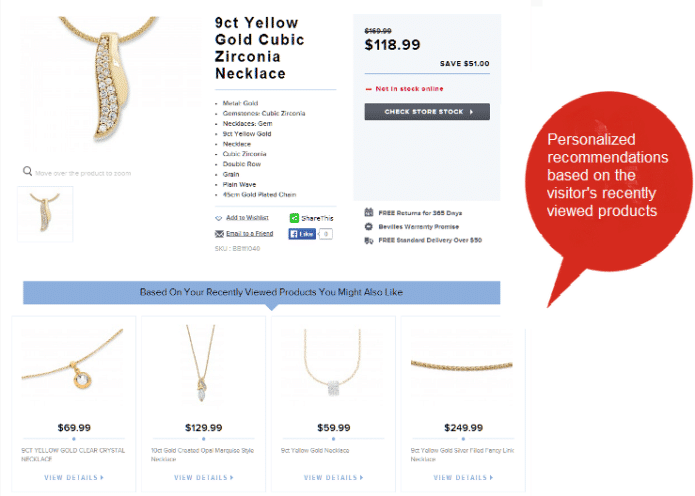
- Recently viewed items
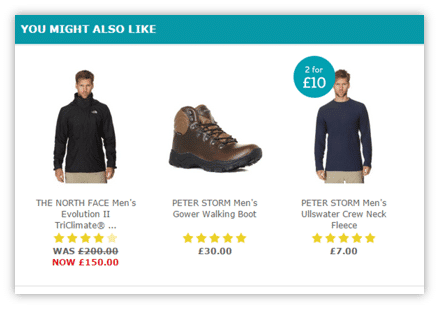
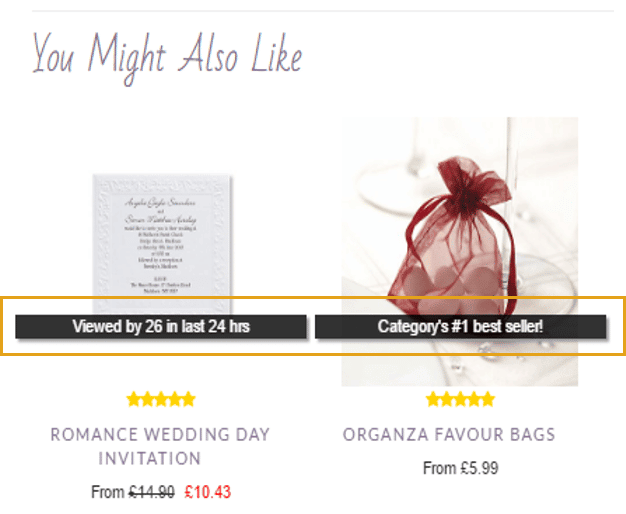
- A mix of the personalized types using a generic title (e.g., “recommended for you,” “you might also like”).
What Is Displayed, Really?
The Title of the Recommendation Set:
The type of product recommendation presented determines the recommendation feature’s title. You can find many ways of titling product recommendations of a similar type.
Some titles are non-conforming to what they’re actually recommended for, such as “you might also like.” These titles can display a mixed strategy.
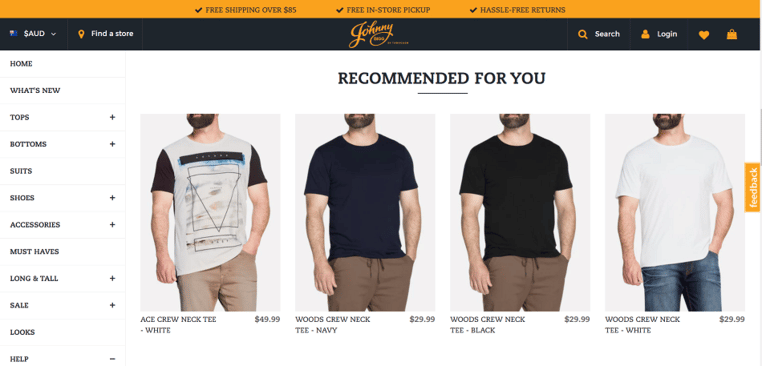
Some titles use social proof (e.g., “customers who viewed this item also viewed”) and transparency about data usage (e.g., “inspired by your shopping cart,” “related to items you’ve viewed”). These two types of titles build trust.
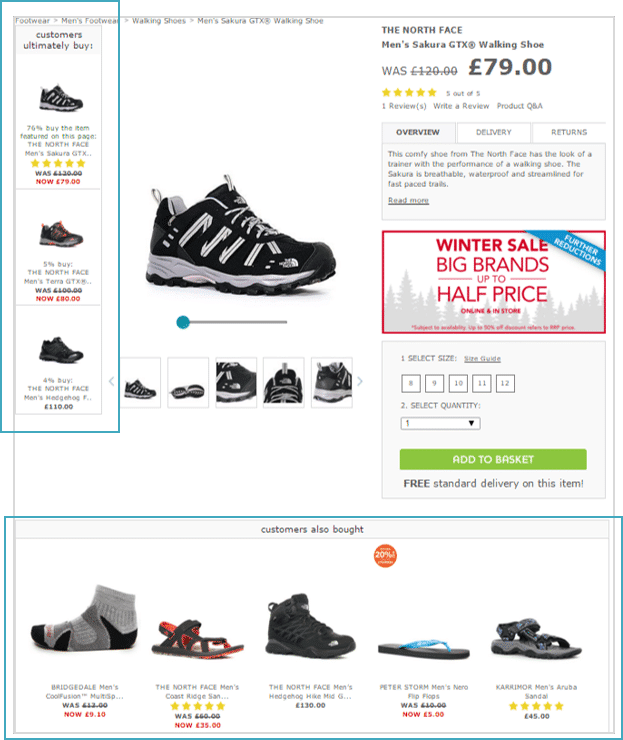
Some types of recommendations may have different titles, which can influence the shopper’s perception. For example, some titles for a cross-selling recommendation set include “frequently bought together,” “complete the look,” and “customers who bought this also bought,” among others.
The Details of the Items:
The recommendations themselves most commonly show the image, name, and price (and discounts) of the item suggested. You can also display available alternative colors, sizes, ratings, social proof notifications, and more.
How Are the Items Recommended Personalized?
The recommendations engine collects information whenever a shopper engages with the company (on-site, in-store, emails, etc.).
This information includes each shopper’s visit, items searched, browsed, added to cart, purchased, rated, reviewed, and shared. Integrating this information indicates the shopper’s behavior, preferences, price sensitivity, and affinities (e.g., brand, color, size), among other factors.
Demographic information is also included in the shopper’s profile, enabling the recommendations engine to make suggestions and predict behavior.
So, to predict which items are relevant, the recommendations engine combines the following rules:
- The intent of the customer – the shopper’s profile. The greatest consideration is given to the most recent visit and to items recently added to the cart or purchased.
- The wisdom of the crowd – aggregated data from a group of shoppers who bought similar items.
- A customized set of variables – selected categories, such as top sellers, items with a good click-through rate, and manually selected items.
How Are the Items Recommended Generated for New Visitors?
A new or anonymous visitor is presented with the final point alone—a customized set of variables—as there is little or no data on them.
New vs. Returning:
For example, a new user visiting the site might see a recommended set of “popular items” with the highest conversion rates. On the other hand, a returning visitor might instead see a recommendation set named “items you might like.” These can also be items with the top conversion rates on the site, but only those specifically relevant to that visitor. A returning visitor may also see personalized popular items.
Matching the Right Generic Recommendation:
As the new visitor engages with the site, more data is collected, which may change the type of generic recommendation. For example, take two visitors browsing the jeans category page. The one who sorts items by lowest price will see generic “on-sale” item recommendations, while the one who sorts items by ratings will see generic “top-rated” recommendations.
Starting to Display Personalized Recommendations:
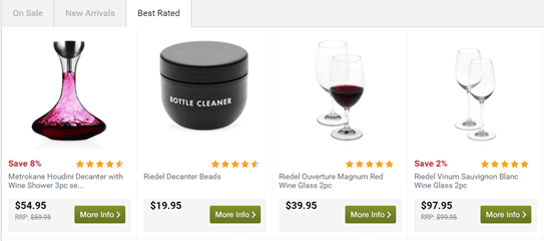
Once the engine has collected enough data (often when the shopper reaches the category or product detail pages), personalized recommendations will begin to appear. Furthermore, when that visitor returns, they will have personalized recommendations from the very beginning.
For example, a first-time visitor to the site saw recommendations for items across multiple product categories.
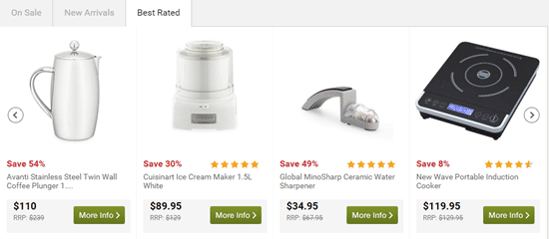
After this visit, the engine understands that this visitor has an affinity for wine, so on their second visit, they see only wine-related product recommendations.
How Are the Product Recommendations Generated in Real Time?
The real-time personalization of the items suggested is a notable advantage.
This dynamism in recommendations is important to match the dynamism of shoppers’ preferences and needs with item availability. Ergo, the recommendations are extremely accurate and relevant at the specific moment when the shopper views them.
On-Site Real-Time Personalization:
The recommendations change in real time based on the user’s engagement. You can set which factors affect the recommendations. Some common real-time changes include:
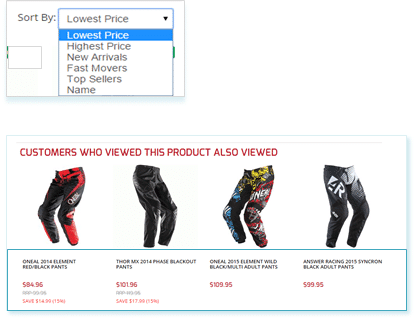
- Recommendations by price sensitivity:
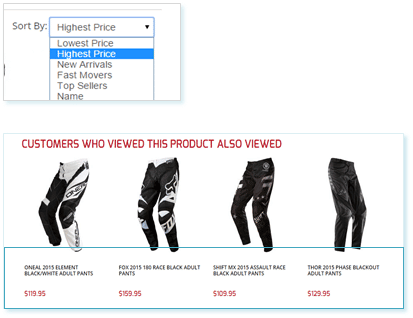
The engine presents low-cost item recommendations to price-sensitive shoppers once they sort a category from low to high.
See how the recommendations change for the same category because of the different sorting:
- Recommendations by size preference:
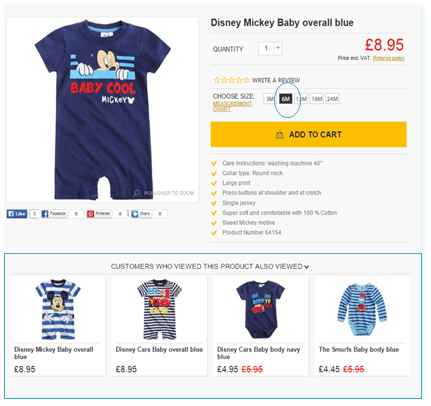
The engine only presents product recommendations that are in stock for the shopper’s selected size.
In the example below, the shopper has selected size 6M, so the engine recommends only outfits that are in stock in that size.
- Recommendations by brand affinity:
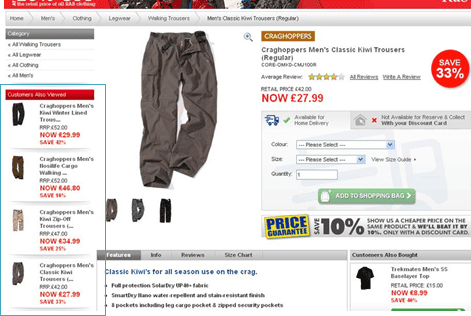
The engine presents product recommendations only for a specific brand once the shopper has shown affinity for it (by browsing it frequently).
For example, this customer has an affinity for Craghoppers trousers.
Emails Real-Time Personalization:
Different engines generate the recommendations at different times.
There are two options for the timing:
- When the email is sent.
- When the customer opens the email, not when it is sent. In this case, the recommendations remain the same for 24 hours since the first opening of the email. A new set of recommendations appears when the customer reopens the email after 24 hours, reflecting any changes.
The second option offers a more accurate personalization of the recommendations. The items generated are relevant at the time the email is opened, when they are most relevant to the customer.
Where Should You Implement Product Recommendations and Which Type?
On-Site Recommendations:
On different pages, visitors are at different stages of their journey. Therefore, on each page, the recommendation type will differ to match the visitor’s needs.
It is impossible to generate personalized recommendations for new visitors. So, at the beginning of their journey, the engine treats new and returning visitors differently.
Below are the best practices for the types of recommendations to use on each page. Note that each company is different, and the optimal types of recommendations might vary depending on your company, purpose, and branding.
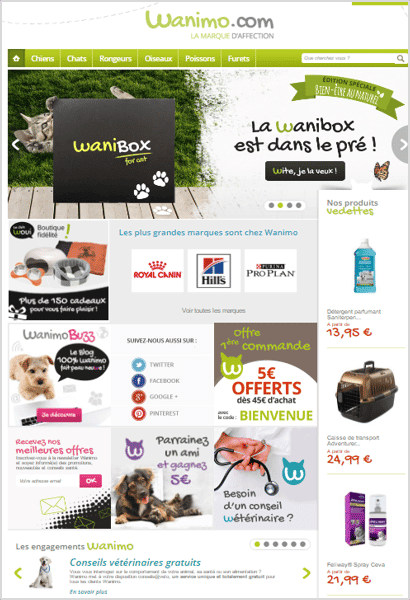
Landing / Home Page:
This page exposes customers to items. It is the first impression and, therefore, must have a strong impact on visitors to encourage them to continue browsing.
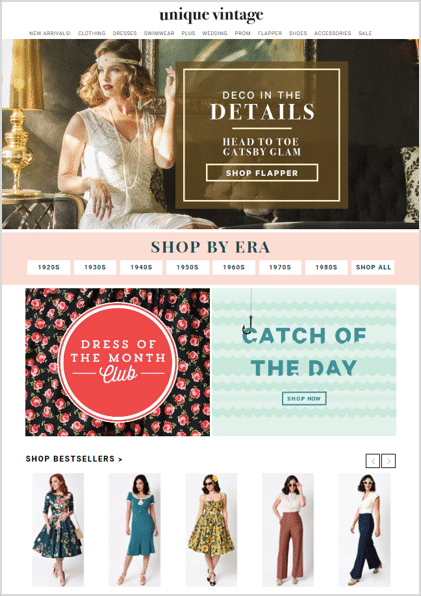
At this point, there is no information about new/anonymous visitors so that they will view generic recommendations.
New visitors:
- Best sellers
- New items
- Trending items
Returning visitors:
- Abandoned items
- Similar items to abandoned items
- Complementary items
- Recently viewed items (from previous visit)
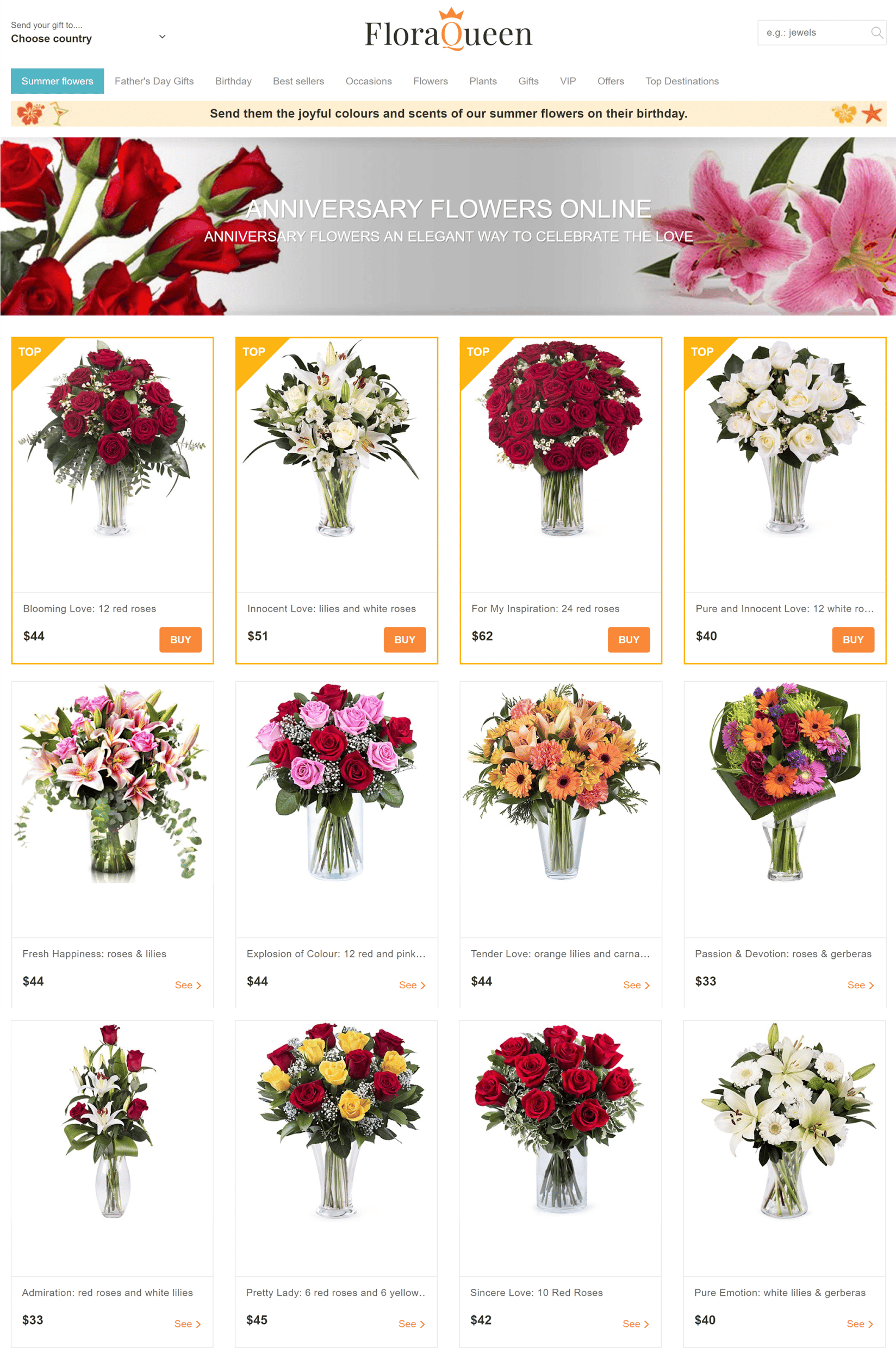
Category Page:
The purpose of product recommendations on this page is most often to create a “shortcut” to finding desired items.
New or returning visitors:
- Best sellers in the category
- Top rated in the category
Returning visitors only:
- A mix of personalized upselling and cross-selling
- Recently viewed items
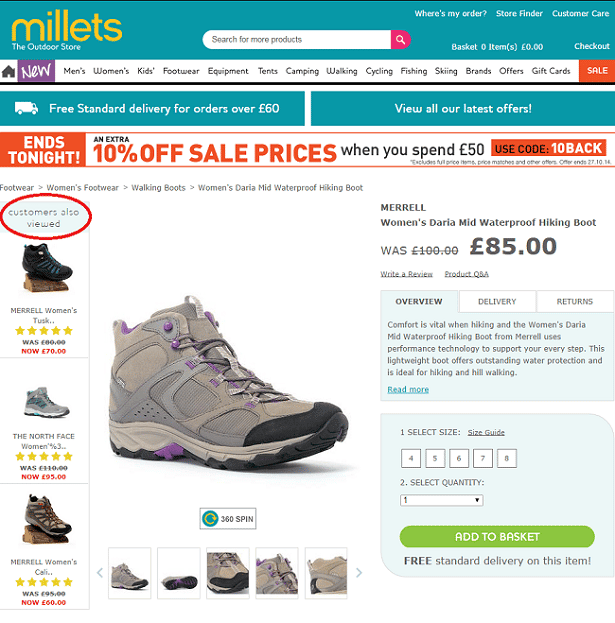
Product Detail Page:
The purpose of the recommendations on this page is to keep visitors engaged and prevent them from leaving the site.
- Similar items to the viewed item
Visitors might leave if the product they are viewing isn’t satisfactory. To prevent losing a purchase, you can recommend alternative items (upselling) that better match the visitor’s standards and needs.
For example, similar items that are cheaper, of different colors, of a slightly different shape but similar style, etc.
- Recently viewed items
Out of Stock Page / 404 Page / No Results Page:
After reaching any one of these pages, the visitor might be frustrated and leave. To keep visitors on your site and encourage them to continue browsing, display desirable items.
- Similar items to the out-of-stock item or searched item
- Best sellers (if possible, personalized)
- Recently viewed items
Shopping cart page:
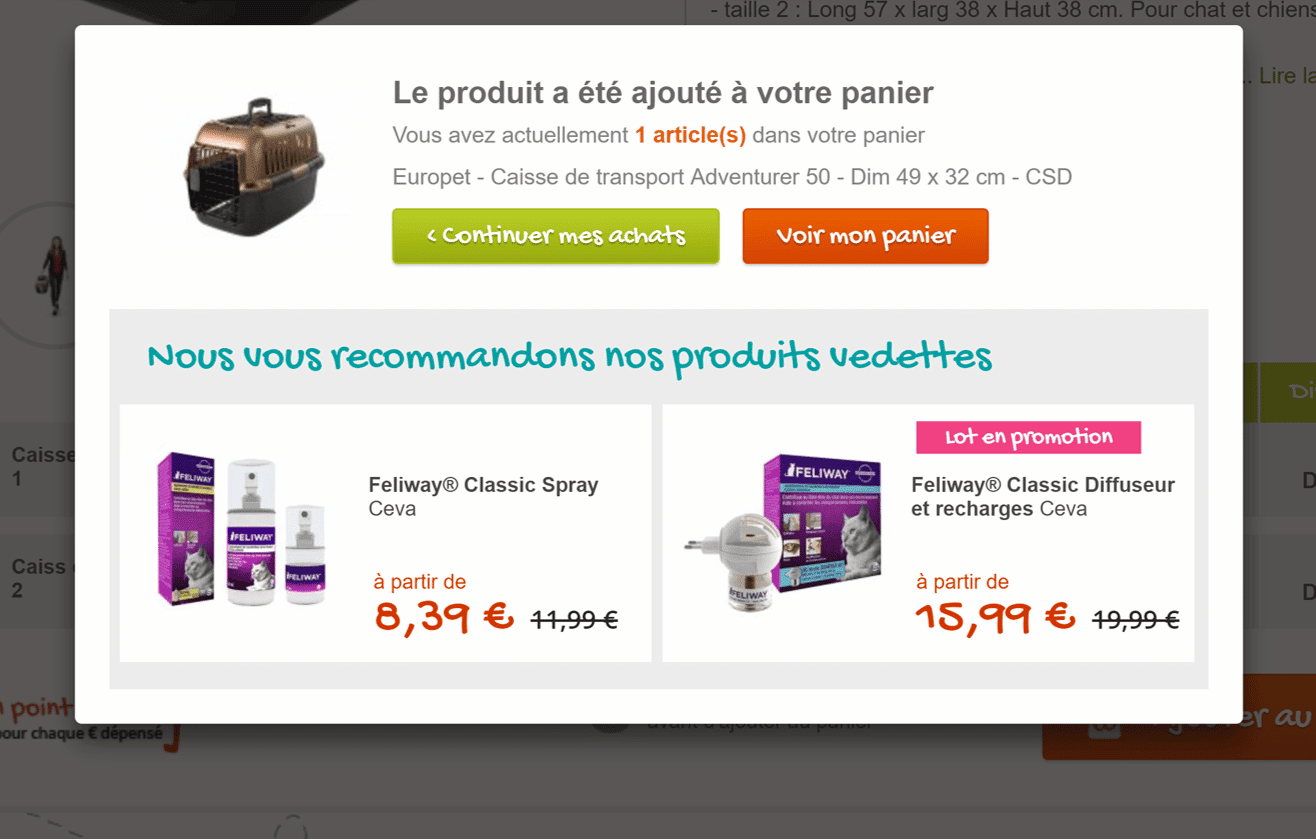
Cross-selling is highly effective on this page at driving impulse purchases and increasing average order value. You can recommend cross-selling items such as:
- Accessories or add-ons for the cart items
- Complementary items (often bought together) to the cart items
- Cross-selling of bestsellers that are unrelated to the cart items
This page is particularly tricky. Recommendations used incorrectly here may result in cart abandonment.
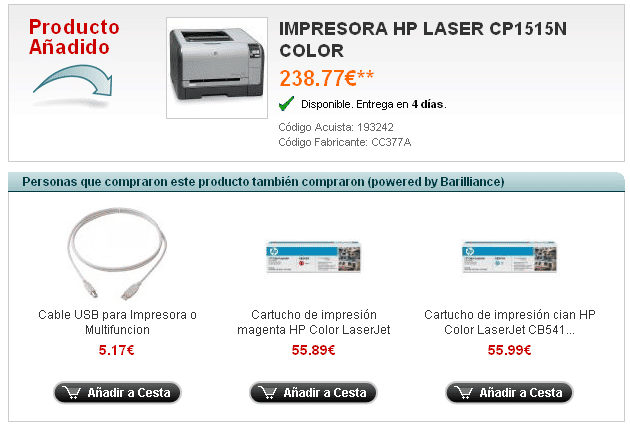
To benefit from the recommendations without losing customers, you must make it super easy for them to add an item without leaving the cart page. You should:
- Provide all basic information on the recommendation feature.
- Have an “add to cart” button on the feature.
- Use a popup to provide more information, not a new page.
This company does it well:
Confirmation Page:
Once the customer has made a purchase, you should still recommend items for another impulse purchase or to build interest in other items for future purchases. You could include:
- Best sellers (related to the purchased items)
- Trending items
- New arrivals
- Cross-selling of items from different categories than the purchased items
Popup, such as a welcome popup and an exit popup, should include product recommendations to keep the shopper interested.
- A mix of personalized upselling and cross-selling (e.g., “items especially for you”)
- Best sellers
- New arrivals
- Promotion and sales items
Emails Recommendations:
Product recommendations are used in various triggered emails.
Each email differs in its purpose, message, and target audience. The type of recommendation will also vary.
See below for the best practices for the types of recommendations to use in each email. Again, consider that this is a generalization.
Cart Abandonment Email:
The purpose of this email is to motivate the customer to return to the site and complete their purchase.
Product recommendations can be another motivator for the customer to click through. In some cases, product recommendations are an even bigger motivator than abandoned items.
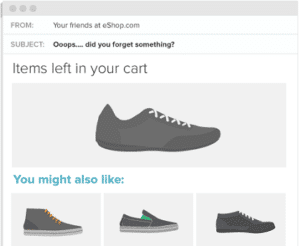
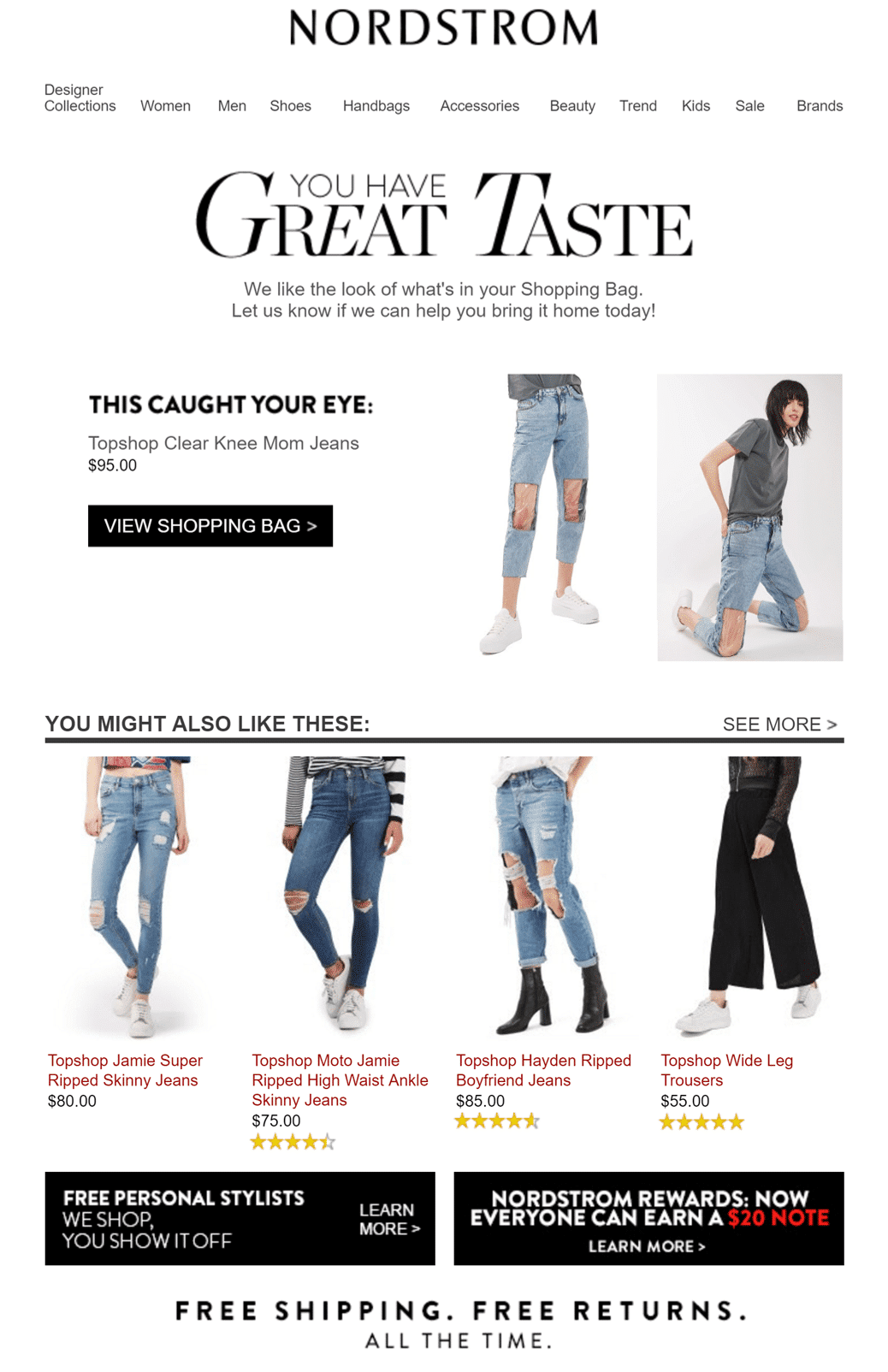
- Similar items
This is sent to customers who abandoned due to a product’s undesirable characteristics, price, color, size, etc.
See Nordstrom’s example, which recommends similar, cheaper items to the item abandoned.
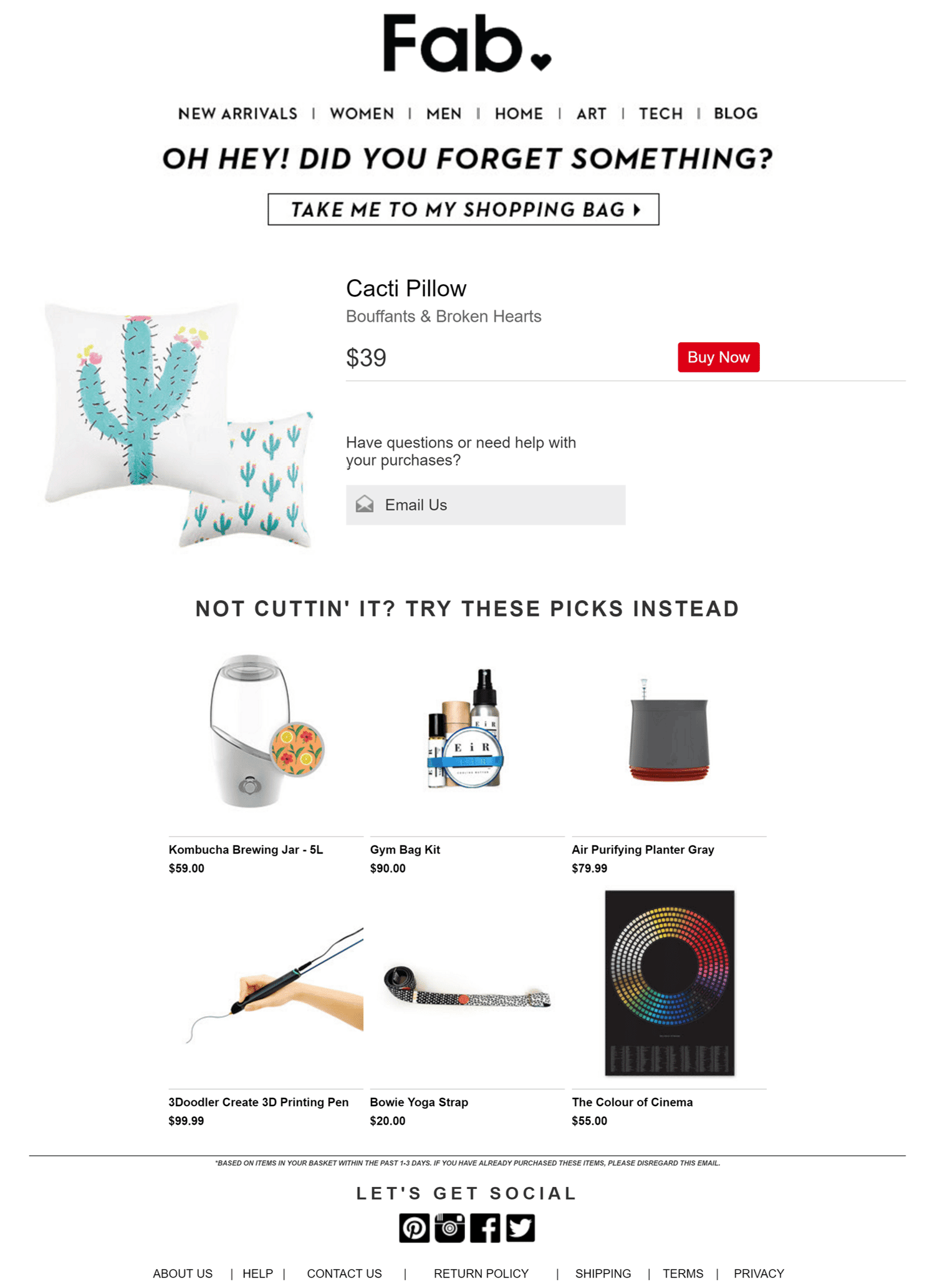
- Complementary items
This is sent to customers who abandoned their carts because they needed more time or were forgetful, to increase the average order value while reminding them of the abandoned items.
Fab’s product recommendations in the cart abandonment email are from completely different categories than the item abandoned.
Product Update Email:
In this email, which updates customers on products, you can also bring to customers’ attention items they may like but have not seen before.
Use a personalized mix of upselling and cross-selling related to the updated product.
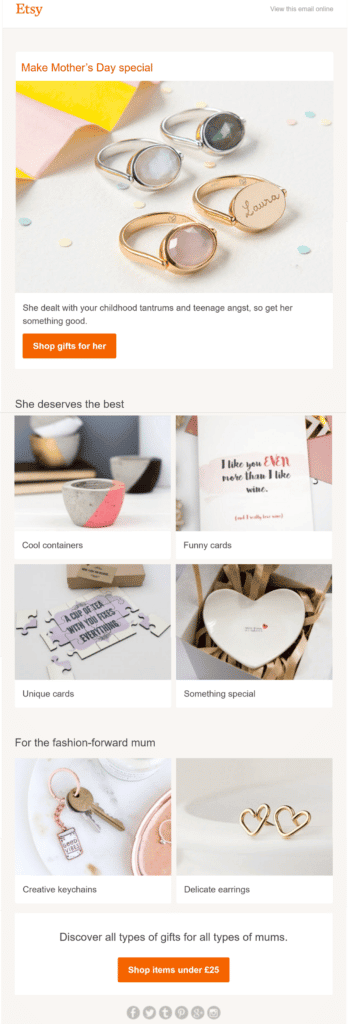
Special Events Email:
Whichever event this email is about (birthday, Halloween, Valentine’s Day, etc.), the product recommendations must be:
- Personalized recommendations related to the occasion
- New, special edition items specifically about the occasion
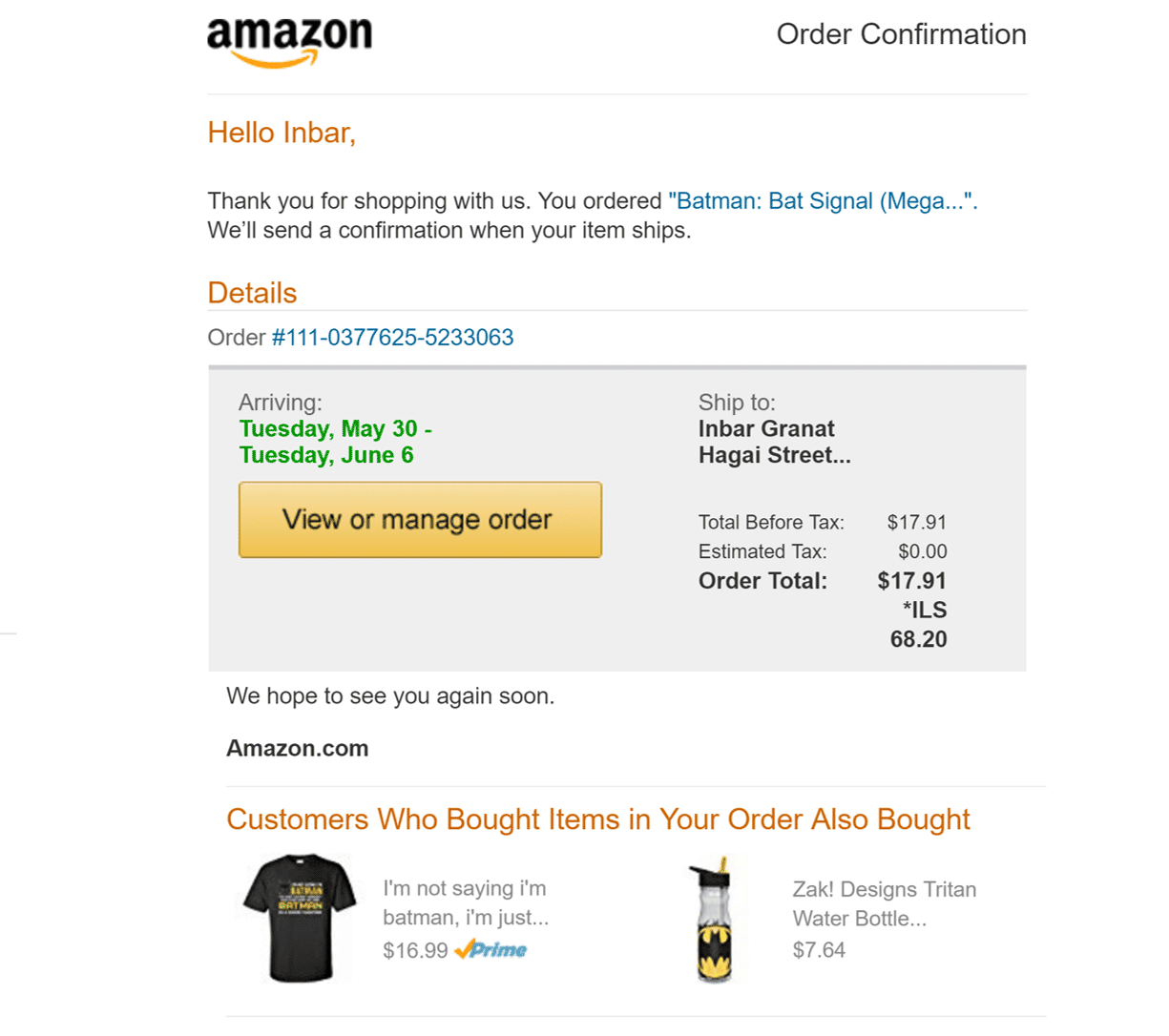
Order Confirmation Email:
After the customer has made a purchase, they receive an order confirmation email. Use this email to keep the customer interested in the company and its products by showing:
- Personalized bestsellers
- New items
- Trending items
- A mix of similar and complementary items to the purchased items
7 Best Practices To Optimize E-commerce Product Recommendations
1. DO locate the recommendations above the fold of the page, on the right-hand side
According to a Barilliance study, the click-through rate (CTR) more than doubles, and sales are 1.7 times higher for above-the-fold recommendations than for below-the-fold recommendations.
2. DO personalize your product recommendations
The same study found that the CTR of personalized “top sellers” was double that of non-personalized “top sellers”.
An additional Barilliance study shows that integrating data from all channels is important. 46% of surveyed customers want personalized product recommendations based on in-store purchases.
3. DO use a “what customers ultimately buy” product recommendation
The same 2014 study found that this recommendation is the most engaging among 20+ recommendation types tested.
4. DO use a “visitors who viewed this product also viewed” recommendation
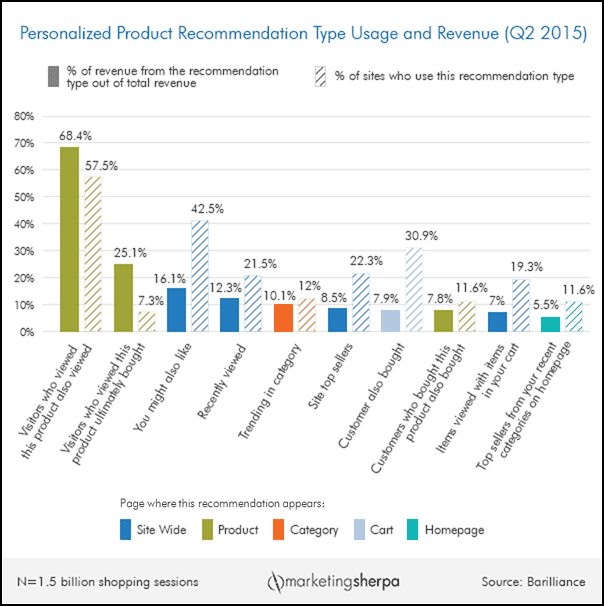
A Barilliance study in 2015 found that this recommendation type generated the most revenue—68.4% of all revenue (see graph below)—out of 20 recommendation types.
Points 3 and 4 show how effective social proof is and how strongly shoppers rely on other shoppers’ actions when making shopping decisions.
5. DO make the product recommendations engaging
The more engaging it is, the higher the probability of a click-through is. For example, changing the image (i.e., the product’s angle) on hover is engaging.
6. DO let your customers have a say in their recommendations
Using shoppers’ information to provide product recommendations raises privacy concerns for some.
You can avoid this by allowing customers to delete their browsing history or by inviting them to provide feedback on the recommendations and adjust accordingly.
7. DO use A/B testing to establish the optimal use of recommendations
Each company has a different purpose, branding, and audience. Therefore, the optimal way to use the recommendations varies by company.
A/B testing is crucial for finding the optimal way to use recommendations on your site. It optimizes the recommendations’ location, type, mix, number of items, number of recommendations per page, size, and more.
It can help you see how even the smallest change, such as the color of the product recommendation title, affects your conversion rate.
5 Common Product Recommendations Mistakes To Avoid
1. DO NOT cross-sell on the product detail page
On this page, customers are searching for the ‘right product,’ so presenting cross-selling items will confuse them and distract them from the process.
Hence, on this page, focus your efforts on helping them find the right item by upselling to match the shopper’s specifications.
According to a Barilliance study, the CTR of “customers also viewed” (upselling) was double the CTR of “customers also bought” (cross-selling) on the product detail page.
2. DO NOT upsell on the cart page
On this page, customers have a strong intention to make a purchase. They have already selected an item.
If you show them similar items, you may cause them to hesitate. Customers may reopen their research, which can deter them from making a purchase.
Thus, cross-sell on this page. This will eliminate the chance of distracting them while likely increasing the average order value.
3. DO NOT offer too many recommendations on one page
It is important to offer shoppers choice; however, too many choices can be confusing and result in a lower conversion rate. Use A/B testing to find out the optimal number of choices for each recommendation set.
4. DO NOT overuse “customers also bought”
The 2015 study by Barilliance shows a discrepancy between the use of this recommendation type by e-tailers (30.9% of sites on the cart page) and the revenue it generates (7.9% of revenue) (higher revenue = buying more items or higher-valued items).
5. DO NOT overuse “you might also like”
As the Barilliance study shows, 42.5% of sites use this recommendation type, yet it accounts for only 16.1% of revenue.
Final Thoughts
In conclusion, dynamic product recommendations are extremely important.
They quickly and easily introduce visitors to relevant items, creating a better customer experience. Consequently, they increase customer engagement, conversions, email click-throughs, average order value, loyalty, and retention.
The recommended items are automatically personalized and dynamic to sharpen relevance and match potential changes (customers’ preferences and items’ availability).
Now that you have learned the various types of product recommendations, which types fit which location on-site and in emails, and the dos and don’ts, you can implement an effective product recommendations campaign.
Always remember that your company is unique. You have unique branding, personality, audience, and items. Therefore, your product recommendations must meet all of these criteria, and you can customize, personalize, and test them.